
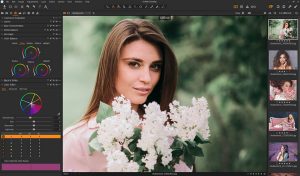
Capture One Pro MacOS is one of the most advanced options available today. Designed for professional photographers, content creators, and digital artists, this software delivers exceptional RAW image processing, industry-leading color grading tools, and a streamlined workflow optimized for macOS.
Unlike many traditional photo editing applications, Capture One Pro focuses heavily on image quality and precision. Whether you’re editing wedding photos, commercial projects, fashion shoots, or landscape photography, the software offers the tools needed to produce professional-level results.
Thanks to its native support for Apple Silicon processors, Capture One Pro runs smoothly on M1, M2, and M3 Macs while taking advantage of the latest macOS technologies.
Key Features of Capture One Pro MacOS
- Advanced RAW Image Processing
- One of the strongest reasons photographers choose Capture One is its exceptional RAW file handling.
- The software preserves image detail, dynamic range, and color accuracy better than many competing applications. This results in cleaner edits and more natural-looking photos.
- Real-World Use Case
- A wedding photographer can recover highlight details from a bright wedding dress while maintaining natural skin tones throughout the image.
- Industry-Leading Color Editing Tools
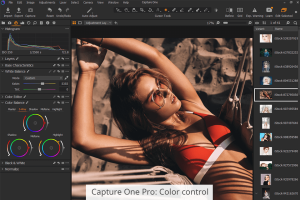
- Color grading is where Capture One truly shines.
- The advanced Color Editor allows users to:
- Fine-tune specific color ranges
- Adjust skin tones
- Create custom color profiles
- Apply professional color corrections
- This feature is particularly useful for portrait and fashion photographers who require consistent color accuracy.
- Layer-Based Editing Workflow
- Unlike many photo editors that rely on destructive editing methods, Capture One uses layers.
- Benefits include:
- Non-destructive editing
- Selective adjustments
- Better project organization
- Easy revision management
- Users can apply masks, gradients, and local adjustments without affecting the original image.
- AI-Powered Editing Tools
- Modern versions of Capture One include intelligent editing tools that speed up workflow.
- These tools help users:
- Automatically select subjects
- Create masks quickly
- Improve image quality
- Reduce editing time
- For professional photographers handling hundreds of images, this can save hours of work.
- Tethered Shooting Support
- Capture One is widely recognized for its industry-leading tethered shooting capabilities.
- Photographers can connect their camera directly to a Mac and view images instantly as they are captured.
- Benefits include:
- Faster review process
- Improved client collaboration
- Immediate quality control
- Better studio workflow
- This feature is especially popular among commercial and fashion photographers.
- Customizable Interface
- The software allows users to customize nearly every aspect of the workspace.
- You can:
- Rearrange tools
- Create custom workspaces
- Save workflow presets
- Improve editing efficiency
- This flexibility helps professionals build an environment tailored to their specific needs.
What’s New in the Latest Version
- Recent updates to Capture One Pro MacOS introduce several improvements designed to enhance performance and productivity.
- Enhanced AI Masking
- Improved AI technology allows faster and more accurate subject selection.
- Better Apple Silicon Optimization
- The software now takes greater advantage of M-series chips, delivering:
- Faster image rendering
- Smoother editing performance
- Improved export speeds
- Performance Improvements
- Users can expect:
- Reduced loading times
- Better catalog performance
- More responsive editing tools
- Workflow Enhancements
- Recent updates streamline common editing tasks and improve overall usability.
Best Alternatives to Capture One Pro MacOS
- Adobe Lightroom Classic
- Lightroom remains one of the most popular alternatives.
- Strengths
- Cloud integration
- Extensive presets
- Strong ecosystem
- Best For
- Photographers who want seamless integration with Adobe Creative Cloud.
- Affinity Photo
- Affinity Photo offers powerful editing tools with a one-time purchase model.
- Strengths
- Affordable pricing
- Professional editing tools
- No subscription
- Best For
- Freelancers and hobbyists seeking value.
- Luminar Neo
- Luminar Neo focuses heavily on AI-assisted editing.
- Strengths
- AI enhancements
- Beginner-friendly workflow
- Creative effects
- Best For
- Users looking for fast and automated photo editing.
- ON1 Photo RAW
- ON1 combines photo organization and editing features in a single application.
- Strengths
- Layer support
- AI tools
- Photo management
- Best For
- Photographers seeking an all-in-one solution.
Pros and Cons
Pros
- Excellent RAW image processing quality
- Advanced color grading and correction tools
- Native support for Apple Silicon Macs
- Industry-leading tethered shooting capabilities
- Highly customizable workspace
- Non-destructive editing workflow
Cons
- Steeper learning curve for beginners
- Premium pricing compared to some alternatives
- Large catalogs may require powerful hardware
- Certain advanced features take time to master
System Requirements
- Before installing Capture One Pro MacOS, ensure your Mac meets these requirements.
- Operating System
- macOS Monterey or later
- Compatible with recent macOS releases
- Processor
- Apple Silicon (M1, M2, M3)
- Intel Core i5 or newer
- RAM
- Minimum: 8 GB
- Recommended: 16 GB or more
- Storage
- At least 10 GB available space
- SSD recommended for optimal performance
- Internet Connection
- Required for activation and updates
How to Install Capture One Pro on Mac
- Installing Capture One Pro MacOS is straightforward.
- Download the installer package from the official source.
- Open the downloaded DMG file.
- Drag the Capture One application into the Applications folder.
- Launch the software from Launchpad or Applications.
- Sign in with your account or activate your license.
- Complete the setup wizard and begin editing your photos.
Download Capture One Pro for macOS

FAQs
- Is Capture One Pro better than Lightroom?
- Capture One offers superior color grading and tethered shooting features, while Lightroom provides stronger cloud integration.
- Does Capture One Pro support Apple Silicon Macs?
- Yes. The software is fully optimized for Apple Silicon processors, including M1, M2, and M3 Macs.
- Can beginners use Capture One Pro?
- Yes, although there is a learning curve. New users can quickly become productive using tutorials and presets.
- Is Capture One Pro suitable for professional photography?
- Absolutely. It is widely used by commercial, fashion, portrait, and studio photographers worldwide.