

This CleanMyMac X review is relevant for users looking to improve storage management, system performance, and overall Mac maintenance.
CleanMyMac X is one of the most popular macOS optimization tools on the market. Developed specifically for Mac users, it combines system cleaning, malware removal, performance monitoring, and storage management into a single application.
Whether you’re a casual user, a creative professional, a student, or a business owner, CleanMyMac X aims to simplify Mac maintenance without requiring advanced technical knowledge.
In this review, we’ll analyze its features, ease of use, performance, alternatives, and whether it’s worth considering for your Mac.
Key Features
- Smart Scan
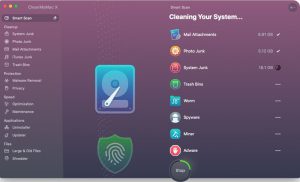
The smart scan feature combines cleaning, protection, and optimization into a single scan. Users can quickly identify unnecessary files and improve system efficiency. - System Junk File Cleaning
CleanMyMac X scans for:
System cache, Temporary files, Application remnants, Log files, Obsolete system data
Removing these files helps free up valuable storage space. - Malware Removal
Unlike basic cleaning utilities, CleanMyMac X includes malware detection tools designed to identify potentially harmful software and suspicious files. - Application Management
Users can completely uninstall applications, including the residual files often left behind after traditional removal methods. - Performance Optimization
The software helps improve responsiveness by managing startup items, background processes, and resource-intensive applications. - Large File Detection
Locate large and old files that consume valuable storage space with detailed storage analysis tools. - Privacy Protection
Cleans browsing history, cookies, download logs, and sensitive user data from compatible applications. - Real-time Monitoring
The menu bar monitor provides information on:
CPU usage, Memory consumption, Disk activity, Battery status, Network activity - Why do Mac users choose CleanMyMac X?
Many Mac users appreciate the reliability of the operating system, but even macOS can accumulate unnecessary files over time. CleanMyMac X addresses common issues such as:
Low storage space,Slow application startup,Unnecessary system files,Boot delays,Unnecessary background processes
By consolidating several maintenance tools into a single interface, the software simplifies Mac management.
What’s New
- Improved Apple Silicon Compatibility
Enhanced optimization for Apple Silicon processors, including M1, M2, and M3 devices. - Improved Cleaning Algorithms
More accurate identification of removable files while protecting important system data. - Enhanced Malware Database
Updated threat detection capabilities for today’s Mac security challenges. - Faster Scanning
Reduced scan times improve the overall user experience. - Refined User Interface
Small design improvements help maintain a modern and intuitive look and feel. - Real-World Use Cases
Students
Students can free up storage space for assignments, presentations, and educational resources. - Creative Professionals
Photographers, video editors, and designers often work with large files. CleanMyMac X helps manage storage efficiently. - Business Users
Professionals can optimize system performance and maintain productivity. - Regular Mac Users
Anyone experiencing storage shortages or slow performance can benefit from regular maintenance. - Remote Workers
Remote workers can improve reliability and responsiveness during daily tasks and video conferences. - Performance and User Experience
One of CleanMyMac X’s greatest strengths is its intuitive design. - The interface is sleek and easy to use. Even novice users can navigate the application with ease.
Best Alternatives
- DaisyDisk
Excellent for visualizing storage usage and identifying large files. - OnyX
A free maintenance utility for macOS that offers advanced system tools. - CCleaner for Mac
Offers cleaning features for temporary files and browser data. - Sensei
Offers optimization tools, monitoring capabilities, and system management features. - AppCleaner
A lightweight application uninstaller designed for macOS.
Pros and Cons
Pros
- Intuitive interface
- Comprehensive cleaning tools
- Malware detection features
- Storage management capabilities
- Apple Silicon compatibility
- Performance monitoring
- Fast scanning process
Cons
- Premium pricing
- Some features may overlap with built-in macOS tools
- Advanced users may prefer manual system administration
System Requirements
- Operating System
Modern versions of macOS recommended - Processor
Mac with Intel processor
Apple Silicon (M1, M2, M3) - Memory
4 GB RAM minimum
8 GB RAM recommended - Storage
Sufficient free space for installation and scanning
How to Install
- Download the installer from the official source.
- Open the downloaded installation package.
- Drag CleanMyMac X to the Applications folder.
- Launch the application.
- Grant the necessary permissions.
- Run the first smart scan.
- Review the recommendations and begin optimization.
Download CleanMyMac X Review for macOS

FAQs
- ¿Es seguro usar CleanMyMac X?
- Sí. Está diseñado específicamente para macOS e incluye medidas de seguridad para evitar la eliminación accidental de archivos importantes del sistema.
- ¿Mejora CleanMyMac X el rendimiento de la Mac?
- Puede mejorar el rendimiento eliminando archivos innecesarios y gestionando los elementos de inicio.
- ¿Es CleanMyMac X compatible con Macs con procesadores Apple Silicon?
- Sí. El software es compatible con los procesadores Apple Silicon modernos.
- ¿Puede CleanMyMac X eliminar malware?
- Sí. Incluye herramientas de detección y eliminación de malware.