
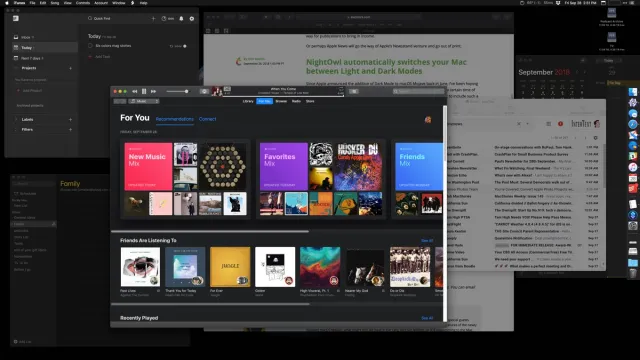
HazeOver is a lightweight productivity application designed specifically for macOS users who want to reduce distractions and improve focus. Unlike traditional productivity apps that rely on timers or task management systems, HazeOver takes a different approach. It automatically highlights the active window while dimming everything else on your desktop.
For writers, developers, designers, students, and remote workers, maintaining concentration can be challenging when multiple windows compete for attention. HazeOver solves this problem elegantly by helping users focus on the task at hand without cluttering their workflow.
In this review, we’ll explore HazeOver’s features, latest improvements, alternatives, pros and cons, installation process, and everything else Mac users should know before using this productivity tool.
Key Features
- Smart Window Highlighting
- The main feature of HazeOver is automatic window highlighting. Whenever you switch to a new application or window, it remains fully visible while background windows become dimmed.
- This simple visual effect reduces distractions and improves concentration during work sessions.
- Adjustable Dimming Levels
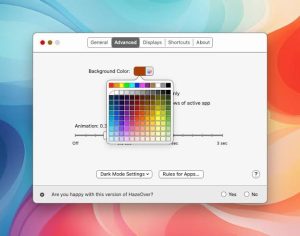
- Users can customize how much background windows are dimmed. Whether you prefer a subtle effect or a stronger contrast, HazeOver allows you to fine-tune the experience.
- This flexibility ensures the app adapts to different work environments and user preferences.
- Multi-Monitor Support
- Many professionals use multiple displays for productivity. HazeOver supports multi-monitor setups and works consistently across all connected screens.
- This feature is especially useful for developers, content creators, and designers who manage several applications simultaneously.
- Native macOS Integration
- HazeOver feels like a natural extension of macOS. It works smoothly with Mission Control, Spaces, Full Screen mode, and modern macOS features.
- The app operates quietly in the background without interrupting your workflow.
- Low Resource Usage
- Unlike some productivity tools that consume significant system resources, HazeOver is lightweight and efficient.
- Users can keep it running throughout the day without noticing any impact on system performance.
- Real-World Use Cases
- Writers can focus on documents without being distracted by messaging apps.
- Developers can concentrate on code editors while reducing visual clutter from browsers and terminals.
- Students can stay focused during research sessions and online learning.
- Remote workers can minimize distractions when handling multiple projects.
What’s New
- Better compatibility with the latest macOS releases
- Enhanced Apple Silicon support
- Improved responsiveness when switching between applications
- Bug fixes for multi-display environments
- Smoother animations and transitions
- Better performance optimization
Best Alternatives
- Focus
- Focus is a productivity application that blocks distracting websites and applications.
- Best for:
- Deep work sessions
- Students
- Remote workers
- Timing
- Timing automatically tracks how users spend their time on macOS.
- Best for:
- Freelancers
- Consultants
- Productivity enthusiasts
- One Switch
- One Switch provides quick access to multiple Mac settings from a single menu.
- Best for:
- Power users
- Professionals
- Mac enthusiasts
- Session
- Session combines focus timers with productivity tracking features.
- Best for:
- Pomodoro users
- Students
- Productivity-focused professionals
Pros and Cons
Pros
- Extremely easy to use
- Native macOS experience
- Lightweight and efficient
- Supports multiple displays
- Improves visual focus
- Minimal learning curve
- Customizable dimming intensity
Cons
- Limited functionality beyond focus enhancement
- May feel unnecessary for some users
- Not a complete task management solution
System Requirements
- Operating System
- macOS 11 Big Sur or later
- Processor
- Apple Silicon or Intel processor
- Memory
- 4 GB RAM minimum
- Storage
- Less than 100 MB available space
- Display
- Supports single and multiple monitor setups
How to Install
- Download the HazeOver installer from the official source.
- Open the downloaded installation file.
- Drag HazeOver into the Applications folder.
- Launch the application from Launchpad or Finder.
- Grant any required accessibility permissions.
- Adjust dimming settings according to your preferences.
FAQs
- ¿Qué hace HazeOver?
- HazeOver ayuda a los usuarios a concentrarse atenuando las ventanas en segundo plano y resaltando la ventana activa.
- ¿HazeOver solo está disponible para Mac?
- Sí. HazeOver está diseñado específicamente para macOS.
- ¿HazeOver afecta el rendimiento del sistema?
- No. La aplicación es ligera y consume muy pocos recursos del sistema.
- ¿HazeOver es útil para la productividad?
- Sí. Muchos usuarios lo encuentran útil para reducir las distracciones visuales y mantener la concentración.