
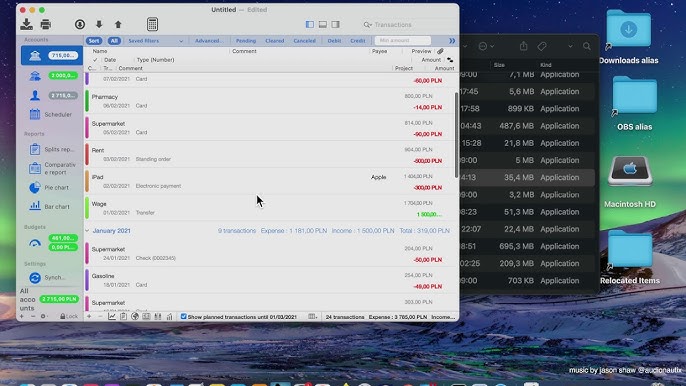
iCompta for Mac becomes a valuable tool for macOS users. Designed specifically for personal finance management, iCompta provides an intuitive way to track spending, monitor budgets, and organize financial accounts from one centralized dashboard.
Whether you’re a student managing monthly expenses, a freelancer tracking income streams, or a family planning household budgets, iCompta offers practical financial management features without the complexity often found in enterprise accounting software.
In this detailed review, we’ll explore everything you need to know about iCompta for Mac, including its features, latest improvements, alternatives, system requirements, installation process, and more.
Key Features of iCompta for Mac
- Simple and User-Friendly Interface
- One of the first things users notice about iCompta is its clean and organized interface. The application follows Apple’s design principles, making it feel native to macOS.
- Users can quickly access:
- Financial accounts
- Budget categories
- Transactions
- Reports
- Investments
- Even beginners can start managing finances without a steep learning curve.
- Real-World Use Case
- A freelancer managing multiple clients can separate business and personal expenses into different accounts while monitoring overall cash flow from one dashboard.
- Comprehensive Budget Management
- Budgeting is the core strength of iCompta.
- Users can:
- Create monthly budgets
- Set spending limits
- Monitor category-based expenses
- Compare planned versus actual spending
- Track savings goals
- The visual budget tracking helps identify overspending before it becomes a problem.
- Multi-Account Support
- Modern users often maintain multiple financial accounts.
- iCompta supports:
- Bank accounts
- Savings accounts
- Credit cards
- Cash accounts
- Investment portfolios
- This centralized management system eliminates the need to switch between banking applications.
- Advanced Reporting and Analytics
- Understanding spending habits is easier when financial data is visualized clearly.
- iCompta offers:
- Pie charts
- Income reports
- Expense reports
- Budget summaries
- Cash flow analysis
- These reports help users make informed financial decisions based on actual spending patterns.
- Investment Tracking
- Beyond basic budgeting, iCompta allows users to monitor investments.
- Supported tracking includes:
- Stocks
- Bonds
- Mutual funds
- Asset performance
- This feature makes the application useful for long-term financial planning.
- Recurring Transactions
- Many monthly expenses repeat automatically.
- Users can schedule recurring transactions for:
- Rent
- Mortgage payments
- Utility bills
- Subscriptions
- Insurance payments
- This automation saves time and reduces manual data entry.
- Data Synchronization
- iCompta supports synchronization across devices, helping users stay updated wherever they work.
- Benefits include:
- Consistent financial records
- Multi-device accessibility
- Improved workflow efficiency
- Secure data management
What’s New in Recent Versions of iCompta
- Recent updates have focused on improving stability, performance, and compatibility with modern macOS releases.
- Notable improvements include:
- Enhanced macOS Compatibility
- Optimized support for newer macOS versions and Apple Silicon processors.
- Faster Database Performance
- Large financial databases now load faster and respond more smoothly.
- Improved Synchronization
- Cloud synchronization has become more reliable and efficient.
- User Interface Refinements
- Minor visual updates improve usability and navigation throughout the application.
- Security Enhancements
- Additional security measures help protect sensitive financial information.
- These improvements make iCompta an even stronger choice for Mac users seeking a reliable personal finance application.
Best Alternatives to iCompta for Mac
- While iCompta is an excellent option, several alternatives are worth considering.
- MoneyWiz
- MoneyWiz offers advanced budgeting and account synchronization features.
- Best for:
- Power users
- Budget enthusiasts
- Financial planners
- Pros
- Comprehensive reporting
- Cloud synchronization
- Multiple account support
- Banktivity
- Banktivity is a popular personal finance application built specifically for Apple users.
- Best for:
- Household budgeting
- Investment tracking
- Financial forecasting
- Pros
- Native macOS experience
- Detailed reports
- Investment management
- Quicken
- Quicken remains one of the most recognized personal finance solutions.
- Best for:
- Long-term financial planning
- Investment management
- Tax preparation support
- Pros
- Powerful financial tools
- Extensive reporting
- Strong budgeting capabilities
- Monarch Money
- Monarch Money focuses on collaborative financial planning.
- Best for:
- Families
- Couples
- Shared budgeting
- Pros
- Modern interface
- Goal tracking
- Collaborative financial management
Pros and Cons of iCompta for Mac
Pros
- Easy to Learn
- The interface is intuitive and beginner-friendly.
- Powerful Budget Tracking
- Provides detailed insights into spending habits.
- Supports Multiple Accounts
- Manage all finances from a single platform.
- Investment Monitoring
- Track assets alongside daily finances.
- Native macOS Experience
- Works smoothly within the Apple ecosystem.
- Recurring Transaction Automation
- Reduces repetitive manual entry.
Cons
- Limited Enterprise Features
- Not designed for large businesses or advanced accounting.
- Learning Curve for Advanced Reports
- Some reporting features may require exploration.
- Premium Features
- Certain capabilities may require paid upgrades depending on the version used.
System Requirements
- Latest macOS version
- 8 GB RAM or higher
- SSD storage
- Stable internet connection
How to Install iCompta for Mac
- Installing iCompta is straightforward.
- Download the Application
- Download the latest version of iCompta from the official source or trusted software repository.
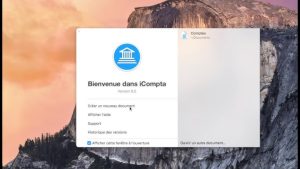
- Open the Installer
- Locate the downloaded DMG file and double-click it.
- Drag to Applications Folder
- Move the iCompta application into the Applications folder.
- Launch the App
- Open Launchpad and start iCompta.
- Configure Your Accounts
- Add financial accounts, budgets, and categories to begin tracking your finances.
- Enable Synchronization
- Configure synchronization options if you plan to use multiple devices.
- Within minutes, you’ll have a fully functioning financial management environment.
Download iCompta for macOS

FAQs
- Is iCompta for Mac good for personal budgeting?
- Yes. iCompta is designed specifically for personal finance management and provides powerful budgeting tools for individuals and families.
- Can iCompta track investments?
- Yes. Users can monitor investment portfolios alongside regular financial accounts.
- Does iCompta support Apple Silicon Macs?
- Recent versions offer compatibility with Apple Silicon processors for improved performance.
- Is iCompta suitable for small businesses?
- It can handle basic financial tracking, but dedicated accounting software may be better for complex business accounting needs.