
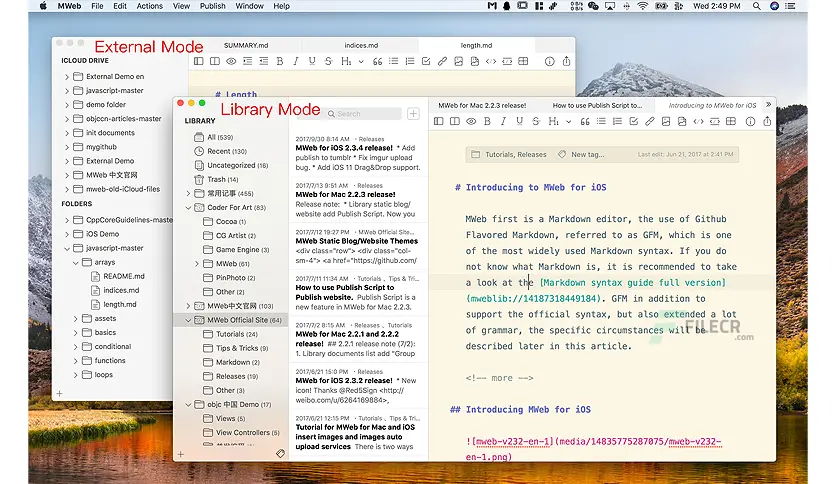
MWeb Pro for Mac is one of the most reliable Markdown editors available for macOS users. In today’s digital world, writers, bloggers, and developers need a clean environment where they can focus purely on content creation without unnecessary distractions.
MWeb Pro for Mac is designed exactly for that purpose. It is a professional-grade Markdown writing application that helps users create, organize, and publish content efficiently. Whether you are a blogger, technical writer, student, or content creator, this tool provides a smooth writing experience with advanced publishing options.
Unlike traditional word processors, MWeb Pro focuses on speed, simplicity, and structured writing using Markdown syntax. This makes it ideal for users who want clean formatting without dealing with complex menus.
Key Features
- Clean and Distraction-Free Writing Interface
- MWeb Pro offers a minimal and elegant interface designed to improve focus. Writers can concentrate on content without UI clutter interfering with productivity.
- Advanced Markdown Support
- One of the strongest features of MWeb Pro is its full Markdown support. It includes:
- Tables
- Code blocks
- Lists
- Headings
- Footnotes
- Math formulas
- This makes it perfect for technical documentation and blogging.
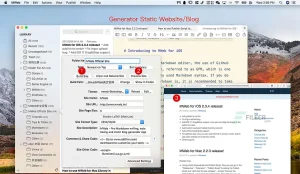
- Publishing to Multiple Platforms
- MWeb Pro for Mac allows direct publishing to platforms such as:
- WordPress
- Medium
- Evernote
- Ghost
- This saves time and removes the need for manual copying and formatting.
- Local and External Library Management
- Users can organize their writing projects in a structured library system. You can store:
- Blog drafts
- Notes
- Documentation
- Research content
- Offline Writing Mode
- MWeb Pro supports offline writing, allowing users to work anywhere without an internet connection.
- Live Preview Mode
- The live preview feature helps users see how their Markdown content will look once published. This is extremely useful for bloggers and developers.
- Image and Media Support
- You can easily insert images, links, and attachments into your documents without breaking the writing flow.
What’s New
- Faster rendering engine
- Improved Markdown compatibility
- Better macOS integration
- Enhanced export options
- Bug fixes and stability improvements
- Improved cloud syncing support
Best Alternatives
- Ulysses
- A premium writing app known for its clean interface and powerful organization system.
- Typora
- A popular Markdown editor with real-time preview and minimal design.
- iA Writer
- Focused on simplicity and distraction-free writing experience.
- Bear
- A note-taking app with Markdown support and beautiful design.
- Obsidian
- A powerful knowledge management tool for linking notes and ideas.
Pros and Cons
Pros
- Excellent Markdown Support
- Provides full Markdown functionality for professional writing.
- Clean User Interface
- Distraction-free environment improves productivity.
- Direct Publishing Options
- Supports multiple blogging platforms.
- Offline Mode
- Write anytime without internet access.
- Fast Performance
- Lightweight and responsive application.
Cons
- Paid Application
- Requires purchase for full access.
- Learning Curve
- Markdown syntax may take time for beginners.
- Limited Design Customization
- Interface customization options are somewhat limited.
System Requirements
- macOS 10.13 or later
- Intel or Apple Silicon (M1, M2, M3 supported)
- Minimum 4 GB RAM
- At least 200 MB free disk space
- Internet connection (for publishing features)
How to Install MWeb Pro for Mac
- Follow these steps to install MWeb Pro:
- Download MWeb Pro for Mac from the official website or trusted source.
- Open the downloaded DMG file.
- Drag the application into the Applications folder.
- Launch the app from Launchpad or Finder.
- Complete setup and start creating your first Markdown document.
Download MWeb Pro for macOS

FAQs
- Is MWeb Pro for Mac free?
- No, MWeb Pro is a paid application, but it offers a professional writing experience.
- Does MWeb Pro support WordPress publishing?
- Yes, it supports direct publishing to WordPress and other blogging platforms.
- Can I use MWeb Pro offline?
- Yes, you can write and edit content offline without any issue.
- Is MWeb Pro good for beginners?
- Yes, but beginners may need time to learn Markdown syntax.