
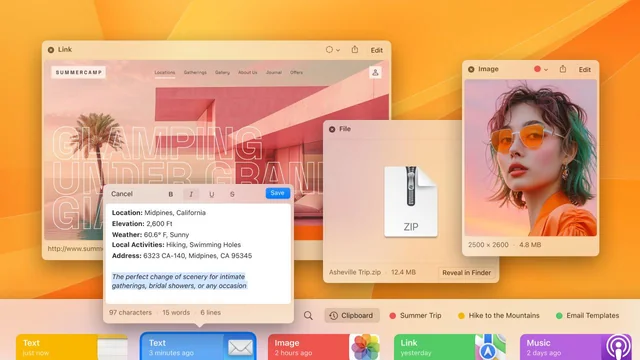
PasteNow for Mac is one of the most useful productivity tools available for macOS users who want to organize and access their clipboard history efficiently.
Unlike the default macOS clipboard, which only remembers the last copied item, PasteNow stores multiple clipboard entries and allows users to search, organize, and reuse copied content whenever needed. Whether you’re a developer, writer, designer, student, or business professional, this app can save time and reduce repetitive tasks.
In this review, we’ll explore PasteNow for Mac, its key features, latest updates, alternatives, installation process, pros and cons, and overall value for Mac users.
Key Features of PasteNow for Mac
- Smart Clipboard History Management
- The biggest advantage of PasteNow is its ability to store clipboard history automatically.
- Instead of losing previously copied content every time you copy something new, the application keeps a complete history of your clipboard activities. This feature is especially useful for professionals who work with multiple pieces of information simultaneously.
- Benefits
- Access previously copied items instantly
- Prevent accidental data loss
- Improve multitasking efficiency
- Save time during research and writing
- Powerful Search Function
- Finding copied content becomes effortless with PasteNow’s built-in search feature.
- Users can search through hundreds or even thousands of stored clipboard entries within seconds. This is particularly helpful when working on large projects that require repeated access to copied information.
- Ideal For
- Content writers
- Researchers
- Developers
- Marketing professionals
- Pin Important Clipboard Items
- Not every copied item should disappear into clipboard history.
- PasteNow allows users to pin important snippets, links, passwords, notes, and frequently used text templates for quick access.
- Common Use Cases
- Email templates
- Frequently used responses
- Project URLs
- Code snippets
- Social media captions
- Organize Content into Collections
- One of the standout features of PasteNow is its collection management system.
- Users can organize copied content into categories and folders, making it easier to manage information for different projects.
- For example:
- Work Documents
- Development Resources
- Study Notes
- Client Projects
- Personal Tasks
- Keyboard Shortcuts for Faster Workflow
- PasteNow supports customizable keyboard shortcuts that allow users to access clipboard history without interrupting their workflow.
- Instead of opening multiple windows, users can quickly launch clipboard records using simple hotkeys.
- This productivity-focused approach makes the application highly efficient for power users.
- Seamless macOS Integration
- PasteNow feels native to macOS.
- The interface follows Apple’s design principles and integrates smoothly with modern versions of macOS. Users can access the app directly from the menu bar without cluttering the desktop.
- The lightweight design ensures minimal impact on system resources.
What’s New in the Latest Version of PasteNow
- Faster clipboard synchronization
- Improved search performance
- Better stability on Apple Silicon Macs
- Enhanced user interface responsiveness
- Bug fixes and security improvements
- Improved compatibility with recent macOS versions
Best Alternatives to PasteNow for Mac
- While PasteNow is an excellent clipboard manager, several alternatives are worth considering.
- Paste
- Paste is one of the most popular clipboard managers for macOS.
- Strengths
- Beautiful interface
- iCloud sync
- Easy organization
- Best For
- Users who prefer premium design and cloud synchronization.
- CopyClip
- CopyClip focuses on simplicity and lightweight performance.
- Strengths
- Easy setup
- Minimal resource usage
- Menu bar access
- Best For
- Users who want a straightforward clipboard history tool.
- Maccy
- Maccy is an open-source clipboard manager designed specifically for macOS.
- Strengths
- Lightweight
- Fast performance
- Open-source
- Best For
- Privacy-conscious users.
- Flycut
- Flycut is a clipboard utility aimed at developers.
- Strengths
- Stores code snippets
- Lightweight operation
- Productivity-focused
- Best For
- Programmers and technical users.
- Alfred Clipboard History
- Alfred offers clipboard history as part of its productivity toolkit.
- Strengths
- Workflow automation
- Advanced search
- Extensive customization
- Best For
- Power users seeking advanced productivity features.

Pros and Cons
Pros
- Easy-to-use interface
- Fast clipboard search
- Clipboard history management
- Supports multiple content types
- Lightweight system usage
- Native macOS experience
- Useful keyboard shortcuts
- Collection and organization tools
Cons
- Advanced features may require premium access
- Learning curve for first-time clipboard manager users
- Some users may prefer cloud synchronization options
System Requirements
- Before installing PasteNow for Mac, ensure your system meets the following requirements.
- Operating System
- macOS Monterey or later recommended
- Processor
- Intel Mac or Apple Silicon (M1, M2, M3, and newer)
- RAM
- Minimum 4 GB RAM
- 8 GB or more recommended
- Storage
- Approximately 100 MB of available storage space
- Internet Connection
- Required for updates and activation if applicable
How to Install PasteNow for Mac
- Installing PasteNow is straightforward.
- Download the latest version from the official source.
- Open the downloaded DMG installation file.
- Drag PasteNow into the Applications folder.
- Launch the application from Applications.
- Grant any required permissions for clipboard monitoring.
- Customize settings, shortcuts, and clipboard preferences.
- Start using clipboard history immediately.
Download PasteNow for macOS

FAQs
- Is PasteNow for Mac free?
- Availability and pricing may vary depending on the version. Some features may be available through premium plans.
- Does PasteNow work on Apple Silicon Macs?
- Yes. PasteNow supports Apple Silicon devices and performs efficiently on modern Mac hardware.
- Can PasteNow store images?
- Yes. The application supports multiple content formats, including text and images.
- Is PasteNow safe to use?
- PasteNow is designed to manage clipboard history locally while providing productivity-focused features for macOS users.