
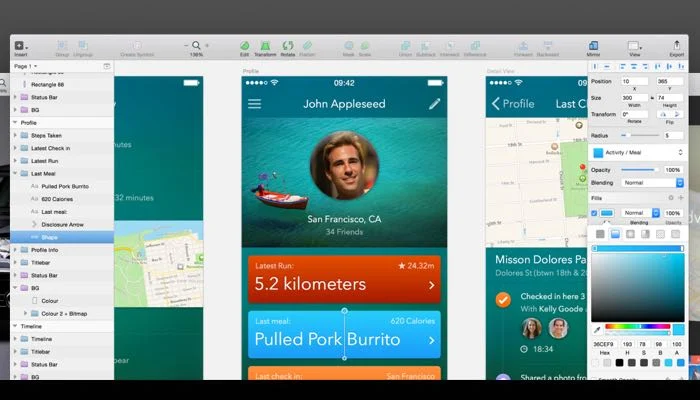
Sketch for Mac is one of the first names you’ll come across. Over the years, Sketch has become a favorite among UI and UX designers thanks to its clean interface, powerful vector editing tools, and seamless workflow.
Unlike many cross-platform design applications, Sketch is designed exclusively for Mac users. This focus allows it to deliver a smooth experience that feels perfectly integrated with macOS. Whether you’re creating website mockups, mobile app interfaces, design systems, or interactive prototypes, Sketch provides a comprehensive toolkit to bring your ideas to life.
In this review, we’ll explore the key features of Sketch Mac, discuss the latest updates, compare alternatives, and help you decide whether it’s the right design software for your workflow.
Key Features of Sketch Mac
- Powerful Vector Editing Tools
- Sketch offers a complete vector-based design environment. Designers can create scalable graphics, icons, illustrations, and interface elements without losing quality.
- The precision editing tools make it easy to align objects, create shapes, and build pixel-perfect designs.
- Real-World Use Case
- A UI designer creating icons for a mobile application can quickly build scalable assets that look sharp on every screen size.
- Intuitive User Interface
- One of Sketch’s biggest strengths is its simplicity.
- The interface feels lightweight and uncluttered compared to many competing design tools. Tools are easy to find, and the workflow is straightforward even for beginners.
- This allows designers to focus on creativity rather than navigating complicated menus.
- Symbols and Reusable Components
- Sketch allows users to create reusable design components called Symbols.
- Instead of editing the same element multiple times, designers can update a single master component and automatically apply changes throughout the project.
- Benefits
- Saves time
- Improves consistency
- Simplifies large projects
- Perfect for design systems
- Advanced Prototyping
- Sketch includes built-in prototyping capabilities.
- You can link screens together and create interactive flows without relying on third-party software.
- This helps teams test user journeys before development begins.
- Design System Support
- Modern design teams often work with extensive design systems.
- Sketch provides excellent support for:
- Shared libraries
- Components
- Color variables
- Typography styles
- Team collaboration
- These tools help maintain consistency across websites, applications, and products.
- macOS Optimization
- Since Sketch is developed exclusively for Mac, it takes full advantage of Apple’s ecosystem.
- Users benefit from:
- Native macOS performance
- Smooth animations
- Faster rendering
- Better system integration
- Optimized resource usage
- This makes Sketch feel responsive even when working on large projects.
What’s New in the Latest Version of Sketch Mac
- Recent versions of Sketch have introduced several improvements focused on performance, collaboration, and workflow efficiency.
- Notable updates include:
- Improved Performance
- Large design files open faster and consume fewer system resources.
- Enhanced Collaboration
- Team members can review projects more effectively through improved cloud-based sharing tools.
- Better Component Management
- Managing reusable symbols and design libraries has become more intuitive.
- Stability Improvements
- Numerous bug fixes have improved reliability during long design sessions.
- Refined User Experience
- The interface has received subtle improvements that make daily tasks quicker and more enjoyable.
Best Alternatives to Sketch Mac
- Although Sketch is excellent, it may not suit everyone. Here are some alternatives worth considering.
- Figma
- Figma has become one of the most popular design platforms due to its browser-based collaboration features.
- Pros
- Real-time collaboration
- Cross-platform support
- Cloud-based workflow
- Cons
- Requires internet for some features
- Subscription costs can increase
- Adobe XD
- Adobe XD offers UI and UX design tools integrated with the Adobe Creative Cloud ecosystem.
- Best For
- Designers already using Photoshop and Illustrator.
- Affinity Designer
- Affinity Designer provides professional vector design tools with a one-time purchase model.
- Best For
- Users looking to avoid recurring subscription fees.
- Framer
- Framer combines design and advanced prototyping capabilities.
- Best For
- Interactive web design projects.
- Lunacy
- Lunacy supports Sketch files while providing additional platform compatibility.
- Best For
- Teams working across different operating systems.

Pros and Cons
Pros
- Designed specifically for macOS
- Fast and lightweight performance
- Excellent vector editing tools
- Powerful component system
- Easy-to-use interface
- Strong plugin ecosystem
- Reliable prototyping features
- Great for UI and UX design
Cons
- Mac-only software
- Limited compared to some cross-platform tools
- Collaboration features may not match Figma’s real-time capabilities
- Subscription pricing may not suit every user
System Requirements
- Latest macOS version
- Apple Silicon processor
- 8 GB RAM or higher
- SSD storage
How to Install Sketch Mac
- Installing Sketch is straightforward.
- Download the latest version from the official Sketch website.
- Open the downloaded DMG file.
- Drag the Sketch application into the Applications folder.
- Launch Sketch from Applications.
- Sign in or create a Sketch account if required.
- Start creating projects and customize your workspace.
- The installation process usually takes only a few minutes.
Download Sketch for macOS

FAQs
- Is Sketch Mac free?
- Sketch typically offers a free trial, while full access requires a paid subscription.
- Is Sketch available for Windows?
- No. Sketch is designed exclusively for macOS and does not have an official Windows version.
- Is Sketch good for UI and UX design?
- Yes. Sketch is widely regarded as one of the best tools for interface design, prototyping, and design systems.
- What is the best alternative to Sketch Mac?
- Figma is often considered the strongest alternative because of its real-time collaboration and cross-platform compatibility.