
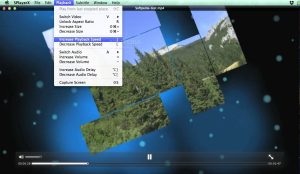
SPlayer Mac is designed for users who want simple yet powerful media playback with support for multiple formats, subtitles, and HD video performance. Whether you are watching movies, tutorials, or personal recordings, this media player ensures a clean and distraction-free experience.
In this detailed guide, we will explore SPlayer Mac features, performance, installation steps, alternatives, and everything you need to know before using it on your macOS device.
Features of SPlayer Mac
- Lightweight Media Playback
- One of the strongest advantages of SPlayer Mac is its lightweight design. Unlike heavy media software, it consumes very low system resources, making it ideal for older Mac devices as well.
- High-Quality Video Support
- SPlayer Mac supports multiple video formats including MP4, MKV, AVI, and more. It ensures smooth HD and Full HD playback without frame drops or buffering issues.
- Subtitle Support
- This media player offers advanced subtitle support. Users can load external subtitles easily and adjust timing, font size, and synchronization for better viewing experience.
- Audio Customization
- SPlayer Mac includes built-in audio controls that allow users to adjust volume, audio tracks, and sound quality according to their preferences.
- Simple and Clean Interface
- The interface is minimal and user-friendly. Even beginners can easily navigate through settings without confusion.
- Hardware Acceleration
- With hardware acceleration support, SPlayer Mac improves video decoding performance, resulting in smoother playback and reduced CPU usage.
- Playlist Management
- Users can create and manage playlists for continuous playback of videos without manual intervention.
What’s New in SPlayer Mac
- Better compatibility with latest macOS versions
- Improved subtitle rendering engine
- Faster video loading time
- Reduced memory consumption
- Enhanced playback stability for 4K videos
Best Alternatives to SPlayer Mac
- If you want to explore other options, here are some of the best alternatives:
- VLC Media Player
- VLC is one of the most popular media players available for macOS.
- Pros:
- Supports almost all file formats
- Completely free
- Open-source software
- Cons:
- Slightly heavy interface
- Advanced settings can be complex
- IINA Player
- A modern macOS-exclusive media player.
- Pros:
- Beautiful macOS-style interface
- Smooth performance
- Active development
- Cons:
- Limited advanced customization
- Elmedia Player
- A powerful media player for Mac users.
- Pros:
- Supports streaming
- Wide format compatibility
- AirPlay support
- Cons:
- Some features are paid
- Movist Player
- A premium media player for macOS.
- Pros:
- Excellent video quality
- Advanced playback controls
- Cons:
- Paid software

Pros and Cons of SPlayer Mac
Pros
- Lightweight and fast performance
- Supports multiple video formats
- Easy-to-use interface
- Good subtitle support
- Low system resource usage
Cons
- Limited advanced features compared to VLC
- Not as frequently updated as competitors
- Basic customization options
System Requirements
- Before installing SPlayer Mac, make sure your system meets the following requirements:
- Latest macOS version
- 4 GB RAM or more
- SSD storage for smooth performance
How to Install SPlayer Mac
- Installing SPlayer Mac is simple and quick.
- Download Software
- Download SPlayer Mac from a trusted source or official website.
- Open DMG File
- Locate the downloaded file and open the DMG installer.
- Drag to Applications
- Drag the SPlayer icon into the Applications folder.
- Launch the App
- Open SPlayer Mac from Launchpad or Finder.
- Grant Permissions
- Allow necessary macOS permissions if prompted.
- Now you are ready to enjoy smooth media playback.
Download SPlayer for macOS

FAQs
- Is SPlayer Mac free to use?
- Yes, SPlayer Mac is generally free, although some versions may include premium features.
- Does SPlayer Mac support all video formats?
- It supports most popular formats like MP4, MKV, AVI, and more.
- Is SPlayer Mac safe for macOS?
- Yes, if downloaded from a trusted source, it is safe to use on Mac systems.
- Which is better, SPlayer Mac or VLC?
- VLC is more powerful, but SPlayer Mac is lighter and simpler for everyday use.