
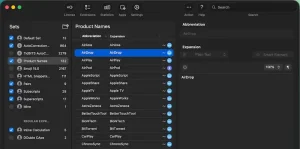
Typinator for Mac is a smart text expansion tool designed to automate repetitive typing tasks. Instead of writing long sentences again and again, you simply type a shortcut, and the software expands it instantly into full text. This not only saves time but also reduces errors and improves overall productivity.
Whether you are a student, writer, developer, or business professional, Typinator helps you streamline your daily work on macOS in a simple and effective way.
Key Features of Typinator 10.0 for Mac
- Powerful Text Expansion System
- At its core, Typinator is built for text automation. You can create custom abbreviations that expand into full sentences, paragraphs, or even complex data.
- For example:
- “addr” → Your full address
- “sig” → Your email signature
- “reply1” → Pre-written email response
- This feature is extremely useful for professionals who handle repetitive communication daily.
- System-Wide macOS Integration
- Typinator works across the entire macOS ecosystem. It supports almost every application, including:
- Safari
- Microsoft Word
- Pages
- Notes
- Social media platforms
- No matter where you type, Typinator is always active in the background.
- Time-Saving Automation
- One of the biggest advantages of Typinator 10.0 for Mac is automation. It reduces manual typing and allows users to complete tasks faster. Over time, this can save hours every week.
- Support for Images and Formatted Content
- Typinator is not limited to plain text. It also supports:
- Images
- Formatted text
- Links
- File paths
- This makes it ideal for designers, marketers, and developers who need more than just text expansion.
- Advanced Rules and Conditions
- Advanced users can create smart rules for dynamic content. This includes:
- Date-based text
- Conditional expansions
- Context-aware snippets
- These features make Typinator more flexible compared to basic text expanders.
- Snippet Management
- Typinator allows users to organize snippets into folders. This helps keep everything structured and easy to access, especially for power users with large libraries.
- Lightweight Performance
- Despite its powerful features, Typinator runs smoothly on macOS without slowing down system performance. It stays in the background and uses minimal resources.
What’s New in Typinator 10.0
- The latest version of Typinator brings several improvements designed to enhance performance and usability:
- Improved compatibility with the latest macOS versions
- Faster text expansion engine
- Enhanced Apple Silicon optimization
- Better stability and fewer crashes
- Improved user interface design
- More reliable snippet synchronization
- These updates make Typinator 10.0 more efficient and user-friendly than previous versions.
Best Alternatives to Typinator for Mac
- While Typinator is powerful, several alternatives offer similar or even extended features.
- TextExpander
- A premium tool known for cloud syncing and team collaboration. Ideal for businesses.
- Alfred
- A productivity powerhouse for macOS that includes text expansion along with app launching features.
- Keyboard Maestro
- A highly advanced automation tool with macros, workflows, and scripting capabilities.
- Rocket Typist
- A simple and lightweight text expander designed for everyday Mac users.
- aText
- A budget-friendly alternative offering essential text expansion features.
- Each tool has its strengths, so the best choice depends on your workflow needs and budget.
Pros and Cons
Pros
- Easy-to-use interface
- Fast text expansion
- Works across all macOS apps
- Lightweight and stable
- Highly customizable snippets
- Supports images and formatted content
Cons
- Paid software with limited free trial
- Advanced features require learning time
- No strong cloud collaboration features
System Requirements
- macOS 10.13 or later
- Intel or Apple Silicon Mac
- Minimum 2 GB RAM
- At least 100 MB free storage
- Internet connection for activation
How to Install Typinator 10.0 on Mac
- Download Typinator 10.0 from the official website
- Open the downloaded DMG file
- Drag the Typinator icon into the Applications folder
- Launch the application
- Grant accessibility permissions when prompted
- Start creating your custom text shortcuts
Download Typinator for macOS

FAQs
- Is Typinator 10.0 safe for Mac?
- Yes, Typinator is safe when downloaded from its official source and is widely used by macOS users.
- Does Typinator work on Apple Silicon Macs?
- Yes, Typinator 10.0 is fully optimized for both Intel and Apple Silicon Macs.
- Can I try Typinator before buying?
- Yes, a trial version is available, allowing users to test its features before purchasing.
- Who should use Typinator?
- Anyone who performs repetitive typing tasks, including writers, developers, students, and business professionals.