
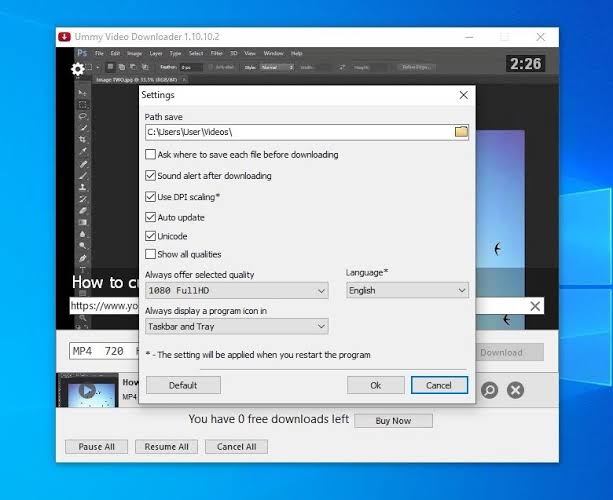
Ummy Video Downloader for Mac is a lightweight application designed to help macOS users download supported online videos quickly and conveniently.
Unlike complicated download managers, Ummy Video Downloader focuses on simplicity. The interface is clean, the setup process is straightforward, and downloading a video usually requires nothing more than copying and pasting a supported video link. This makes it suitable for beginners while still offering enough functionality for regular users.
If you’re looking for a practical tool to save supported online videos for offline viewing, this review covers everything you need to know about Ummy Video Downloader for Mac, including its features, latest improvements, alternatives, pros and cons, installation steps, and more.
What is Ummy Video Downloader for Mac?
Ummy Video Downloader for Mac is a desktop utility that allows users to download supported online videos directly to their Mac. Instead of relying on a constant internet connection, users can save videos locally and watch them whenever they want.
The software is designed with ease of use in mind. Simply paste a supported video URL into the application, select the preferred quality, and start downloading. It is particularly useful for users who frequently watch educational videos, tutorials, webinars, or other legally downloadable content offline.
Key Features
- Simple and Clean Interface
- One of the biggest strengths of Ummy Video Downloader is its beginner-friendly design. The interface is uncluttered, making it easy to understand even for first-time users.
- Fast Video Downloads
- The application is optimized for quick downloading from supported sources. Once the video URL is pasted, the download process begins within seconds.
- Multiple Video Quality Options
- Depending on the available source, users can download videos in different resolutions such as:
- 360p
- 480p
- 720p HD
- 1080p Full HD
- Higher resolutions where available
- This flexibility allows users to balance storage space and video quality.
- Audio Extraction
- Some supported videos allow audio extraction, making it possible to save music, interviews, podcasts, or lectures in audio format when appropriate.
- Lightweight Application
- Unlike large multimedia suites, Ummy Video Downloader occupies very little storage space and uses minimal system resources during operation.
- Offline Viewing
- Downloaded videos remain available even without an internet connection, making them ideal for travel, remote work, or studying in areas with limited connectivity.
What’s New
- The latest version of Ummy Video Downloader includes several enhancements designed to improve usability and performance.
- Improved Compatibility
- Recent updates ensure better support for newer versions of macOS.
- Faster Performance
- Optimized download handling results in smoother and more reliable performance.
- Better Stability
- Bug fixes help reduce crashes and improve the overall user experience.
- User Interface Improvements
- Minor design refinements make the software easier to navigate and more responsive.
- Performance Optimizations
- Background processes have been optimized to reduce resource consumption while downloading videos.
Best Alternatives to Ummy Video Downloader for Mac
- If Ummy Video Downloader doesn’t fully meet your needs, several excellent alternatives are available for macOS users. Each offers its own strengths depending on whether you prioritize speed, format support, browser integration, or media management.
- Downie
- Downie is one of the most popular video downloaders for macOS. It supports thousands of websites, offers browser integration, and automatically detects downloadable videos. It’s an excellent choice for users who need advanced downloading capabilities.
- Best For
- Professional users
- Downloading from multiple websites
- High-quality video downloads
- PullTube
- PullTube combines a modern interface with powerful downloading features. Users can download entire playlists, extract audio, and convert videos into different formats.
- Best For
- Playlist downloads
- Audio extraction
- Simple workflow
- 4K Video Downloader
- 4K Video Downloader is a well-known solution for downloading videos in high resolutions, including 4K and even 8K when supported. It also supports subtitles and channel downloads.
- Best For
- High-resolution videos
- Playlist downloads
- Subtitle support
- Airy Video Downloader
- Airy Video Downloader offers a straightforward interface with support for multiple resolutions and browser integration, making it ideal for everyday users.
- Best For
- Beginners
- Fast downloads
- Browser integration
- ClipGrab
- ClipGrab is a free video downloader that supports downloading and converting videos into several popular formats. It is lightweight and suitable for users looking for a free alternative.
- Best For
- Free downloads
- Format conversion
- Casual users

Pros and Cons
Pros
- Simple and beginner-friendly interface
- Fast download speeds on supported websites
- Lightweight and resource-efficient
- Multiple video quality options
- Offline viewing support
- Easy copy-and-paste workflow
- Organized download management
- Compatible with modern macOS versions
- Suitable for both personal and educational use
Cons
- Website support may vary depending on service changes
- Fewer advanced features compared to premium competitors
- Some features may be limited in certain versions
- Download availability depends on supported platforms and applicable copyright restrictions
System Requirements
- macOS 10.13 High Sierra or later
- Intel or Apple Silicon processor
- 4 GB RAM
- 200 MB available storage
- Stable internet connection
How to Install Ummy Video Downloader for Mac
- Installing Ummy Video Downloader is quick and straightforward.
- Download the latest version from the official developer’s website.
- Open the downloaded DMG file.
- Drag Ummy Video Downloader into the Applications folder.
- Open the application from Launchpad or Finder.
- If macOS displays a security prompt, grant the necessary permissions.
- Copy a supported video URL, paste it into the application, choose your preferred quality, and start downloading.
Download Ummy Video Downloader for macOS

FAQs
- Is Ummy Video Downloader for Mac free?
- The software may offer a free version with basic functionality, while additional features may require a paid license depending on the edition.
- Is Ummy Video Downloader safe?
- When downloaded from the official developer, the software is generally considered safe to install on macOS.
- Does Ummy Video Downloader support Apple Silicon Macs?
- Recent versions are designed to work with modern macOS systems, including Apple Silicon Macs where supported.
- Can I download videos in HD quality?
- Yes. Depending on the source, the application can download videos in multiple resolutions, including HD and Full HD when available.