
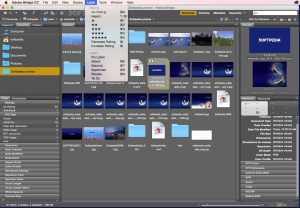
Adobe Bridge CC is a powerful digital asset management application designed to help Mac users efficiently organize, preview, edit, and manage creative files. Whether you’re a photographer, graphic designer, content creator, or digital artist, Adobe Bridge CC simplifies file management by providing a centralized workspace for your creative assets.
Unlike traditional file explorers, Adobe Bridge CC offers advanced organizational tools, metadata management, batch processing, and seamless integration with Adobe Creative Cloud applications. As creative projects grow in size and complexity, having a reliable asset management solution becomes increasingly important.
In this review of Adobe Bridge CC for Mac, we’ll explore its features, recent updates, advantages, disadvantages, installation process, and the best alternatives available for macOS users.
Features
- Advanced File Organization
- Adobe Bridge CC allows users to efficiently organize thousands of files. You can create collections, apply classifications, add tags, and sort assets according to your workflow.
- Visual Asset Preview
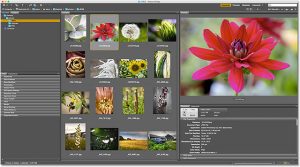
- One of its most outstanding features is the visual preview system. Users can quickly preview images, videos, PDFs, Illustrator files, and Photoshop documents without opening additional applications.
- Metadata Management
- Managing metadata is essential for creative professionals. Adobe Bridge CC allows you to edit, add, and organize metadata, making it easier to find and categorize files.
- Batch Renaming
- The batch renaming feature saves significant time when working on large projects. Users can instantly rename hundreds of files using customizable naming rules.
- Creative Cloud Integration
- Adobe Bridge CC integrates seamlessly with Photoshop, Illustrator, InDesign, Lightroom, and other applications, creating a smooth creative workflow.
- Keyword Management
- Users can assign keywords to files, improving searchability and the organization of resources in large content libraries.
- Contact Sheets and PDF Creation
- The software can generate contact sheets and PDF presentations directly from selected files, making it easier to present to clients.
- Batch Processing
- Bridge CC allows users to automate repetitive tasks, improving productivity and reducing manual effort.
What’s New
- Faster file indexing and previews
- Improved metadata editing tools
- Better synchronization with Creative Cloud
- Greater stability on Macs with Apple Silicon processors
- Optimized performance for macOS
- Updated user interface elements
- Improved batch export workflows
- These improvements make Adobe Bridge CC more agile and efficient for professional users.
- Real-world use cases
- For photographers
- Photographers can organize thousands of RAW images, assign ratings, add keywords, and quickly locate specific photos.
- For graphic designers
- Designers benefit from easy access to Photoshop, Illustrator, and InDesign assets, keeping project folders organized.
- For marketing teams
- Marketing professionals can manage branding materials, promotional graphics, and campaign assets from a centralized location.
- For content creators
- Video creators and digital editors can organize media files and improve their workflow efficiency.
Best Alternatives
- Apple Photos
- Apple Photos offers basic photo organization and cloud syncing for Mac users.
- Adobe Lightroom
- Lightroom provides advanced photo management and editing features for photographers.
- Eagle
- Eagle is a modern digital asset management tool designed for creative professionals.
- Photo Mechanic
- Photo Mechanic is popular among professional photographers who need to quickly select and organize images.
- NeoFinder
- NeoFinder helps Mac users efficiently catalog and manage large media libraries.
Pros and Cons
Pros
- Free to use
- Excellent file management tools
- Powerful metadata editing
- Seamless integration with Adobe
- Batch processing
- Supports multiple file formats
- Works flawlessly on modern Macs
Cons
- Limited editing features
- Requires the Adobe ecosystem for full functionality
- Can be overwhelming for beginners
- Large libraries may require optimization
System Requirements
- macOS Monterey or later
- Intel or Apple Silicon processor
- 8 GB of RAM
- 4 GB of available storage
- Internet connection for updates
How to Install
- Visit the Adobe Creative Cloud website and download the Creative Cloud desktop application.
- Install Creative Cloud and sign in with your Adobe account.
- Find Adobe Bridge CC in the application’s control panel.
- Click the Install button.
- Wait for the installation to complete.
- Open Adobe Bridge CC and configure your preferences.
Download Magic Disk Cleaner for macOS

FAQs
- ¿Es Adobe Bridge CC gratuito para Mac?
- Sí, Adobe Bridge CC se puede descargar gratis y usar sin necesidad de una suscripción a Creative Cloud.
- ¿Funciona Adobe Bridge CC en Macs con procesadores Apple Silicon?
- Sí, las versiones recientes están optimizadas para procesadores Apple Silicon y ofrecen un rendimiento excelente.
- ¿Es Adobe Bridge CC mejor que Finder?
- Para los profesionales creativos que gestionan grandes bibliotecas multimedia, Adobe Bridge CC ofrece muchas más herramientas de organización y gestión de archivos que Finder.
- ¿Se pueden editar fotos con Adobe Bridge CC?
- Adobe Bridge CC se centra en la gestión y organización de archivos. Para la edición de fotos, funciona junto con Adobe Photoshop y Lightroom.