
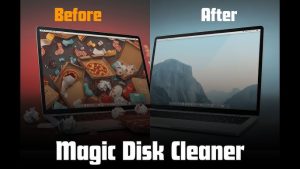
Magic Disk Cleaner is a macOS utility designed to remove unnecessary files from your Mac and optimize storage usage.
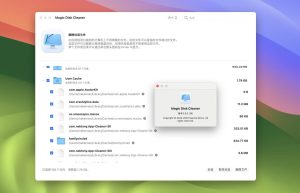
The software scans your system for:
- Cache files
- Temporary files
- Junk folders
- Duplicate items
- Unused application data
- Large hidden files
By cleaning up these unnecessary files, users can free up valuable storage space and improve macOS performance.
Unlike complex system optimization applications, Magic Disk Cleaner offers an intuitive interface that works seamlessly on both Intel and Apple Silicon Macs.
Magic Disk Cleaner for Mac Review 2026
If your Mac is running out of space or slowing down over time, you’re not alone. Many macOS users struggle with junk files, duplicate data, system cache, and unnecessary storage consumption. That’s where Magic Disk Cleaner comes in.
Magic Disk Cleaner is a lightweight cleaning utility for Mac designed to help users reclaim disk space, improve system performance, and keep macOS optimized without complicated configurations. Unlike many resource-intensive optimization tools, this application focuses on simplicity, speed, and intuitive storage management.
Features
- Intelligent Junk File Detection
- One of Magic Disk Cleaner’s standout features is its intelligent scanning system.
- The software quickly identifies:
- System junk files
- Browser cache
- Application remnants
- Temporary downloads
- Unused language files
- This helps users reclaim storage space without having to manually search through folders.
- Fast Disk Cleanup
- Speed is crucial when cleaning a Mac, and Magic Disk Cleaner performs remarkably fast scans.
- Even large-capacity SSDs can be scanned in minutes, which is convenient for users with heavy workloads.
- The cleaning process is also lightweight, meaning the application won’t slow down your Mac while running.
- Duplicate File Finder
- Duplicate files often consume a lot of storage space without users realizing it.
- Magic Disk Cleaner includes a built-in duplicate finder that detects:
- Duplicate photos
- Duplicate videos
- Additional documents
- Similar downloads
- This feature is especially useful for photographers, video editors, and students.
- Large File Analyzer
- Another excellent feature is the large file scanner.
- The application helps users identify huge files that take up unnecessary storage space, such as:
- Old video projects
- DMG installers
- Forgotten downloads
- Archived backups
- This allows users to clean up storage more strategically.
- Native macOS Design
- Unlike many Windows-style optimization tools, Magic Disk Cleaner feels like a native Mac application.
- The interface includes:
- Dark Mode support
- Retina display optimization
- Smooth animations
- Apple-style navigation
- Minimal resource consumption
- The clean design makes the software easy to use, even for beginners.
- Optimization for Apple Silicon
- The application is fully optimized for:
- Macs with M1
- Macs with M2
- Macs with M3
- Users with Apple Silicon devices will notice faster scan speeds and greater overall efficiency.
What’s New
- Improved Scanning Accuracy
- The latest update improves junk file detection and reduces false positives.
- This ensures users only delete unnecessary files.
- Enhanced macOS Sonoma Compatibility
- Magic Disk Cleaner now runs more smoothly with the latest macOS versions, including Sonoma, and the most recent Apple Silicon devices.
- Faster Duplicate Detection
- The duplicate scanner has been updated for faster and more accurate scanning of large folders.
- Reduced CPU Usage
- The latest optimization update minimizes CPU and RAM usage during cleaning operations.
- This is especially beneficial for older Macs.
Best Alternatives
- CleanMyMac X
- One of the most popular Mac optimization applications.
- Ideal for:
- Complete system optimization
Malware scanning
Performance management
DaisyDisk - DaisyDisk offers attractive storage visualization tools.
- Ideal for:
- Visual disk analysis
Large file management
SSD cleaning
OnyX - A free, advanced maintenance utility for macOS.
- Ideal for:
- Advanced users
Deep system customization
Maintenance scripts
CCleaner for Mac - A simple cleaning utility focused on cleaning your browser and junk files.
- Ideal for:
- Beginners
Quick cleaning tasks
Pros and Cons
Pros
- User-friendly interface
- Fast scanning performance
- Excellent duplicate finder
- Optimized for Apple Silicon
- Safe cleaning process
- Lightweight app design
- Helps recover significant storage space
Cons
- Some advanced features may require premium access.
- System optimization tools are limited compared to more comprehensive packages.
- It does not include malware removal features.
System Requirements
- macOS Ventura or later
- Mac with Apple Silicon processor
- SSD storage
- 8 GB of RAM or more
How to Install
- Download the installer
- Download the latest version of Magic Disk Cleaner from the official website.
- Open the DMG file
- Locate the installer in your Downloads folder and open it.
- Move the application to Applications
- Drag Magic Disk Cleaner to the Applications folder.
- Launch the application
- Open the program from Finder or Launchpad.
- macOS may request system permissions the first time you launch it.
- Start scanning your Mac
- Click the Scan button to begin scanning your Mac’s storage and junk files.
Download Magic Disk Cleaner for macOS

FAQs
- Is Magic Disk Cleaner safe for Mac?
- Yes, Magic Disk Cleaner uses a safe cleaning process and allows users to review files before deleting them.
- Does Magic Disk Cleaner work on Macs M1 and M2?
- Yes, the application is optimized for Apple Silicon devices, including Macs M1, M2, and M3.
- Can Magic Disk Cleaner remove duplicate files?
- Absolutely. The software includes a built-in duplicate file finder.
- Will Magic Disk Cleaner improve Mac performance?
- In many cases, removing junk files and freeing up storage space can improve system responsiveness and speed.