
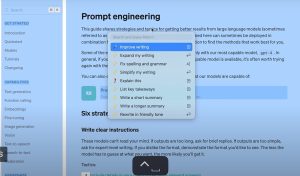
BoltAI Mac App Review Artificial intelligence tools have become an essential part of modern workflows, especially for Mac users looking to improve their productivity, writing, programming, research, and content creation. In this BoltAI for Mac (version 2.12.1) review, we’ll take a detailed look at one of the most popular native AI assistants, designed specifically for macOS.
Unlike browser-based AI tools, BoltAI integrates directly into your Mac environment, providing quick access to advanced AI features without constantly switching tabs. Whether you’re a software developer, student, marketer, writer, or business professional, BoltAI offers a streamlined way to interact with AI models, maintaining a clean and distraction-free workflow.
Version 2.12.1 introduces several improvements that optimize stability, speed, and overall usability. This review covers everything you need to know before installing BoltAI on your Mac.
Key Features
- Native macOS Experience
One of BoltAI’s biggest advantages is its native integration with macOS. The application feels like a true Mac app, rather than a web app with a desktop interface.
Users enjoy smoother navigation, faster performance, and a user interface that adheres to Apple’s design principles. - Benefits
- Faster response times
- Improved memory management
- Seamless integration with macOS
- Enhanced multitasking
- Compatibility with Multiple AI Models
BoltAI supports connections with various AI providers, giving users flexibility to suit their needs. - Instead of limiting users to a single ecosystem, the application allows professionals to switch between different models for tasks such as writing, programming, brainstorming, and research.
- Real-world use case
A software developer might use one model for code generation, while a content writer might use another for blog creation and editing. - Custom Prompt Library
For users who frequently perform repetitive tasks, BoltAI includes prompt management features. - You can save frequently used prompts for:
- Blog writing
- Email creation
- Marketing copywriting
- Programming assistance
- SEO content generation
- Social media planning
- Privacy-focused workflow
Privacy remains a major concern for AI users.
BoltAI offers greater control over conversations and workflows compared to many browser-based alternatives, making it attractive to professionals managing sensitive projects. - Shortcuts
The application includes keyboard shortcuts that allow you to access AI assistance almost instantly. - Users can activate BoltAI while working in:
- Safari
- Chrome
- Xcode
- VS Code
- Notion
- Microsoft Office applications
- Optimized performance
BoltAI is designed to run efficiently on modern Apple hardware. - Whether you use:
- MacBook Air
- MacBook Pro
- iMac
- Mac Studio
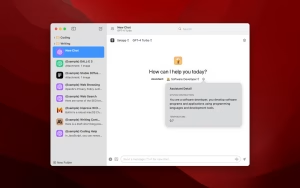
- Clean User Interface
A clean interface helps users focus on their work. - The minimalist design ensures:
- Easy navigation
- Fewer distractions
- Faster learning
- A better user experience
What’s New
- Performance Improvements
The latest version improves responsiveness and overall application stability. - Users will notice:
- Faster startup times
- Improved processing
- Better resource optimization
- Bug Fixes
- Several reported issues have been resolved.
- These fixes help improve:
- Session stability
- Conversation management
- Consistency of the user experience
- Improved macOS Compatibility
- The update improves compatibility with the latest versions of macOS and Apple Silicon devices.
- This ensures a smoother experience on:
- Macs with M1
- Macs with M2
- Macs with M3
- Future Apple hardware
- Improved Workflow Efficiency
- Small improvements to the user interface make navigation more intuitive and reduce unnecessary clicks.
- Best BoltAI Alternatives for Mac
- While BoltAI is impressive, some users may prefer alternative AI applications.
- 1ChatGPT Desktop
- A popular option for users who want direct access to the OpenAI ecosystem.
- Ideal for:
- General AI assistance
- Typing tasks
- Research projects
- TypingMind
TypingMind offers a highly customizable AI interface. - Ideal for:
- Power users
- Custom workflows
- Advanced prompt management
- Raycast AI
- Raycast combines productivity tools with AI-powered assistance.
- Ideal for:
- Keyboard-first users
- Productivity enthusiasts
- MacGPT
- MacGPT integrates AI functionality directly into macOS.
- Ideal for:
- Quick access to AI
- Lightweight workflows
- Elephas
- Elephas focuses on writing and content creation.
- Ideal for:
- Bloggers
- Marketing professionals
- Business users
Best Alternatives
- While BoltAI is impressive, some users may prefer alternative AI applications.
- ChatGPT Desktop
A popular option for those who want direct access to the OpenAI ecosystem. - Ideal for:
- General AI assistance
- Typing tasks
- Research projects
- TypingMind
- TypingMind offers a highly customizable AI interface.
- Ideal for:
- Power users
- Custom workflows
- Advanced prompt management
- Raycast AI
- Raycast combines productivity tools with AI-powered assistance.
- Ideal for:
- Keyboard-first users
- Productivity enthusiasts
- MacGPT
- MacGPT integrates AI functionality directly into macOS.
- Ideal for:
- Quick access to AI
- Lightweight workflows
- Elephas
- Elephas focuses on writing and content creation.
- Ideal for:
- Bloggers
- Marketing professionals
- Business users
Pros and Cons
Pros
- Excellent macOS integration
Feels like a native Mac app. - Fast performance
Runs smoothly even on lightweight Mac systems. - Flexible AI support
Works with multiple AI providers. - Intuitive design
Easy to use for both beginners and professionals. - Productivity enhancements
Save time with shortcuts and prompt libraries.
Cons
- Requires API configuration
Some users may find the configuration somewhat technical. - Advanced features require learning
Advanced features require some initial exploration. - Internet connection required
Most AI features depend on an internet connection.
System Requirements
- Latest version of macOS
- Apple Silicon processor
- 8 GB of RAM or more
- SSD storage
- Stable internet connection
How to Install
- Download the latest BoltAI installer.
- Open the downloaded file.
- Drag BoltAI to your Applications folder.
- Launch the application.
- Configure your preferred AI provider.
- Add your API credentials if required.
- Start using your AI-powered productivity tools.
Download BoltAI Mac App Review for macOS

FAQs
- ¿Está disponible BoltAI para macOS?
- Sí. BoltAI está diseñado específicamente para usuarios de Mac y se integra de forma nativa con macOS.
- ¿Es compatible BoltAI con Macs con procesadores Apple Silicon?
- Sí. Funciona de manera eficiente en dispositivos con procesadores Apple Silicon, incluidos los chips M1, M2 y posteriores.
- ¿Es BoltAI adecuado para desarrolladores?
- Por supuesto. Los desarrolladores pueden usar BoltAI para obtener ayuda con la codificación, la depuración de código, la creación de documentación y la automatización de flujos de trabajo.
- ¿Puede BoltAI mejorar la productividad?
- Sí. Funciones como las bibliotecas de sugerencias, los atajos y la asistencia de IA ayudan a los usuarios a completar tareas más rápido.