
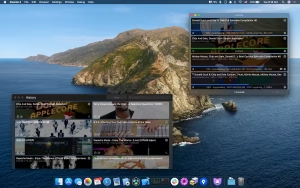
Downie is a professional video downloader designed exclusively for macOS users. The application allows you to download videos from thousands of websites quickly and securely.
Unlike many web tools, Downie integrates seamlessly with the Mac ecosystem and delivers excellent performance on both Intel and Apple Silicon Macs.
Downie for Mac Review 2026
Downloading online videos on a Mac can sometimes be frustrating, especially when browser extensions stop working or free downloaders flood your screen with ads. That’s why many macOS users are turning to Downie, one of the most reliable video download applications available for Mac.
Whether you want to save YouTube tutorials, online classes, documentaries, podcasts, or social media videos, Downie offers a smooth and easy-to-use experience. The software is designed specifically for macOS, making it faster and more stable than many generic download tools.
Features
- Compatible with over 1,000 websites
One of Downie’s biggest advantages is its broad website compatibility. Users can download videos from over 1,000 platforms. - Some of the most popular supported sites include:
- YouTube
- Vimeo
- TikTok
- Twitter/X
- Dailymotion
- This flexibility makes Downie a comprehensive solution for downloading online media.
- Native macOS experience
Many download programs are unintuitive on Mac, but Downie was designed specifically for macOS. - The application includes:
- Clean interface
- Smooth animations
- Dark mode support
- Retina display optimization
- Apple Silicon support
- Everything feels lightweight and responsi
- Drag-and-drop simplicity
Downloading videos is incredibly easy. Users simply drag the video URL to the application window. - Downie automatically detects media content and starts downloading instantly.
- This feature is especially useful for beginners looking for a hassle-free experience.
- High-Quality Video Downloads
Downie supports multiple quality formats, including: - 720p
- 1080p
- 4K
- Audio-Only Extraction
This makes it ideal for users who want offline videos with impeccable picture quality. - Fast Download Speeds
Performance is one of Downie’s strengths. - The software uses optimized download technology to reduce waiting time and improve speed without consuming too many system resources.
- Mac M1, M2, and M3 users often notice significantly faster processing.
- Subtitle Support
Another standout feature is subtitle downloading. - If subtitles are available, Downie can automatically download them along with the video. This is useful for:
- Language learners
- Students
- International content users
- Browser Extension Integration
Downie integrates with most popular browsers, including: - Safari
- Google Chrome
- Firefox
What’s New
- Improved Optimization for Apple Silicon
Downie now works even better on: - MacBook Air M1/M2
- MacBook Pro M3
- Mac Studio
- iMac Apple Silicon
The application launches faster and manages downloads more efficiently. - Improved YouTube Compatibility
YouTube frequently updates its system, causing many video downloaders to crash. - Downie receives regular updates to maintain compatibility with YouTube and other streaming platforms.
- This reliability is one of the reasons many professionals prefer it to free alternatives.
- Improved Media Detection
The latest update improves video detection on modern websites, making downloads smoother and more accurate. - Improved Stability
Users have reported fewer crashes and better memory optimization in the latest version. - This is especially beneficial for users downloading large HD video files.
Best Alternatives
- While Downie is excellent, some users may want to compare alternatives before choosing a downloader.
- PullTube
- PullTube offers a simple interface and allows you to download playlists.
- Ideal for:
- Beginners
YouTube playlists
Batch downloading
4K Video Downloader - This software supports ultra HD downloads and is compatible with multiple platforms.
- Ideal for:
- 4K video enthusiasts
Windows and Mac users
Playlist downloading
Folx - Folx combines download management with torrent compatibility.
- Ideal for:
- Advanced users
File organization
Download scheduling
Any Video Converter - This application focuses more on media conversion but also includes download capabilities.
- Ideal for:
- Format conversion
Multimedia workflows
Pros and Cons of Downie
Pros
- Extremely easy to use
- Fast video downloads
- Native macOS design
- Compatible with over 1,000 websites
- Frequent software updates
- Excellent Apple Silicon performance
- Subtitle support
- Browser integration
Cons
- Paid software
- Some websites may occasionally lose compatibility
- Does not include a built-in video editor
System Requirements
- macOS 10.15 Catalina or later
- Intel or Apple Silicon processor
- Stable internet connection
- 200 MB of free space
How to Install
- Download the app
Download the latest version from the official website. - Open the DMG file
Locate the downloaded DMG installer in your Downloads folder. - Go to Applications
Drag the Downie app to the Applications folder. - Launch the software
Open Downie from Finder or Launchpad. - Your Mac may request permission the first time you open it.
- Start downloading videos
Paste any compatible video URL into Downie and start the download instantly.
The best programs for downloading videos on Mac

FAQs
- Is Downie safe to use on a Mac?
- Yes, Downie is safe and trusted by thousands of Mac users worldwide.
- Can Downie download YouTube videos?
- Yes, Downie supports YouTube and over 1,000 other websites.
- Does Downie work on Macs with M1 and M2 processors?
- Absolutely. The software is optimized for Macs with Apple Silicon processors, including the M1, M2, and M3 models.
- Can Downie download subtitles?
- Yes, subtitle downloads are supported when available on the source platform.