
iExplorer for Mac is a popular macOS utility designed to help users browse, transfer, and manage data stored on iOS devices. Whether you need to export messages, copy music from an iPhone to a Mac, access hidden files, or create additional backups, this software provides a straightforward solution.
In this detailed review, we’ll explore the key features, latest improvements, alternatives, pros and cons, system requirements, installation process, and real-world use cases of iExplorer for Mac.
What Is iExplorer for Mac?
iExplorer is a desktop application for macOS that allows users to access and manage content stored on iPhones, iPads, and iPod Touch devices.
Unlike Apple’s default syncing methods, iExplorer gives users direct access to files, media libraries, messages, contacts, call history, and device backups.
This makes it especially useful for users who need more flexibility when handling iOS data.
Key Features of iExplorer for Mac
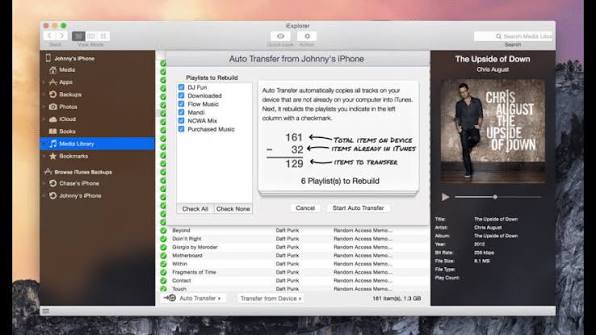
- Transfer Music Without iTunes
- One of the biggest reasons users choose iExplorer is its ability to transfer music from an iPhone or iPad directly to a Mac.
- Benefits include:
- Copy songs from iPhone to Mac
- Transfer playlists
- Export music libraries
- Recover lost tracks
- Move media without syncing restrictions
- This feature is particularly useful when switching computers.
- Access Photos and Videos Easily
- iExplorer makes it simple to browse and export media files stored on iOS devices.
- Users can:
- Transfer photos
- Export videos
- Organize media folders
- Back up image collections
- Recover important memories
- The drag-and-drop interface makes the process quick and user-friendly.
- Export Messages and Conversations
- Many users rely on iExplorer to save important conversations.
- Supported exports include:
- SMS messages
- iMessages
- Attachments
- Group chats
- Conversation history
- Messages can be saved as PDF, text, or CSV files for future reference.
- Browse Device Files
- iExplorer provides file-system access that goes beyond what Finder typically offers.
- Users can browse:
- Application folders
- Device storage
- Backup files
- Documents
- Hidden directories
- This functionality is especially valuable for advanced users and developers.
- Manage Contacts and Calendars
- The software allows users to export and back up personal information stored on their devices.
- Supported data includes:
- Contacts
- Calendar entries
- Notes
- Voice memos
- This makes device migration and data recovery significantly easier.
- Access iTunes Backups
- iExplorer enables users to browse existing backups created through Finder or iTunes.
- Benefits include:
- Backup inspection
- Data extraction
- Recovery of deleted files
- Access to archived content
- This can be extremely helpful when restoring important information.
- User-Friendly Interface
- Despite offering advanced functionality, iExplorer maintains an intuitive design.
- Features include:
- Simple navigation
- Organized menus
- Fast device detection
- Easy export options
- Even first-time users can quickly learn the software.
What’s New in the Latest Version?
- Recent updates to iExplorer have focused on performance, compatibility, and security improvements.
- Better Apple Silicon Support
- The latest versions run more efficiently on Apple Silicon Macs, including M1, M2, M3, and newer processors.
- Improved iOS Compatibility
- Support for newer iOS releases ensures reliable communication between devices and macOS systems.
- Enhanced Device Detection
- Recent updates have improved the speed and accuracy of device recognition.
- Stability Improvements
- Bug fixes and optimizations contribute to a smoother overall user experience.
- Security Enhancements
- Updates continue to strengthen data handling and backup reliability.
Best Alternatives to iExplorer for Mac
- While iExplorer is an excellent solution, several alternatives are worth considering.
- iMazing
- iMazing is one of the most popular iOS management tools available for macOS.
- Key features:
- Device backups
- App management
- File transfers
- Message exports
- AnyTrans
- AnyTrans offers comprehensive device management capabilities with a modern interface.
- Features include:
- Data migration
- Backup tools
- Media transfer
- Cloud integration
- WALTR PRO
- WALTR PRO focuses on transferring files to Apple devices without iTunes.
- It supports:
- Music
- Videos
- Documents
- E-books
- Finder
- Modern versions of macOS include Finder-based device management for basic backup and synchronization tasks.
- EaseUS MobiMover
- MobiMover provides simple transfer and backup functionality for iOS users.
Pros and Cons of iExplorer for Mac
Pros
- Easy to use
- Fast file transfers
- Music recovery features
- Message export capabilities
- Access to device backups
- Supports multiple iOS devices
- Reliable performance
- Clean interface
Cons
- Some advanced features require a paid license
- Interface design may feel slightly dated
- Not all system files are accessible
- Occasional compatibility delays after major iOS releases
System Requirements
- Latest macOS version
- 4 GB RAM or higher
- Stable USB connection
- Updated iOS device software
How to Install iExplorer for Mac
- Download the Software
- Download the latest version of iExplorer from a trusted source.
- Open the Installer
- Locate the downloaded file and launch the installer.
- Move to Applications Folder
- Drag the application into the Applications directory.
- Launch iExplorer
- Open the application from your Applications folder.
- Connect Your iPhone or iPad
- Use a Lightning or USB-C cable to connect your device.
- Grant Permissions
- Approve any required permissions to allow communication between macOS and your iOS device.
- Start Managing Data
- Browse files, export content, and create backups as needed.
Download Sidenotes VSCode Extension for macOS

FAQs
- Is iExplorer for Mac safe to use?
- Yes, iExplorer is generally considered safe when downloaded from a trusted source.
- Can iExplorer transfer music from iPhone to Mac?
- Yes. One of its most popular features is transferring music and playlists from iOS devices to macOS.
- Does iExplorer support Apple Silicon Macs?
- Yes, recent versions support Apple Silicon processors, including M1, M2, M3, and newer models.
- Is iExplorer free?
- iExplorer offers limited functionality in its trial version, while advanced features require a paid license.