
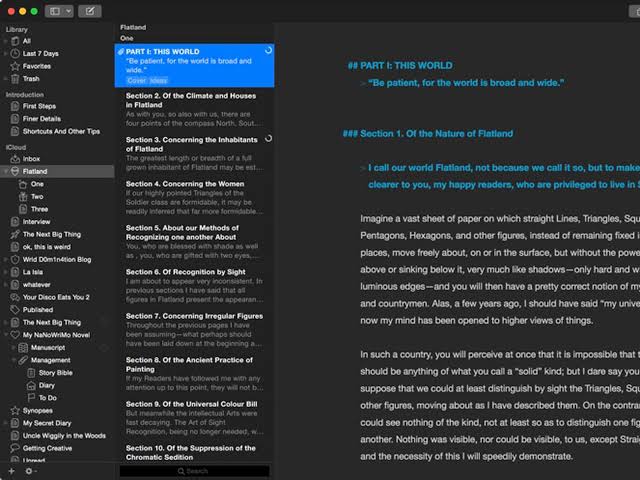
Ulysses is one of the most popular writing applications available for macOS. Designed specifically for writers, bloggers, students, authors, journalists, and content creators, it combines a clean interface with powerful writing tools to create a focused and productive environment.
Unlike traditional word processors that often feel cluttered with menus and formatting options, Ulysses takes a minimalist approach. It helps users focus on writing while still providing advanced features for organization, publishing, and project management.
Whether you’re drafting a novel, preparing blog content, writing academic papers, or managing professional documentation, Ulysses offers a streamlined workflow that feels perfectly at home on macOS.
In this review, we’ll explore its features, latest improvements, alternatives, pros and cons, system requirements, installation process, and everything you need to know before using Ulysses on your Mac.
Key Features
- Clean and Distraction-Free Writing Environment
- One of Ulysses’ biggest strengths is its minimalist design.
- The interface removes unnecessary distractions and allows writers to focus entirely on their content. Instead of dealing with multiple toolbars and complicated menus, users can work within a clean writing space that promotes concentration.
- Real-World Use Case
- Authors working on long-form projects can stay immersed in their writing without constantly switching between formatting tools.
- Powerful Library Organization
- Ulysses provides an integrated library system that helps users organize writing projects efficiently.
- You can:
- Create folders
- Group projects
- Use keywords and filters
- Manage multiple writing assignments
- This organizational structure makes it easy to handle large writing projects.
- Markdown Support
- Ulysses uses a simple markup system that allows users to format content quickly without leaving the keyboard.
- Writers can create:
- Headings
- Lists
- Links
- Quotes
- Emphasis
- This approach speeds up content creation and reduces formatting distractions.
- Publishing and Export Options
- Ulysses offers extensive export capabilities.
- Users can export content to:
- DOCX
- HTML
- ePub
- The application also supports direct publishing to blogging platforms and content management systems.
- Real-World Use Case
- Bloggers can draft articles in Ulysses and publish them online without switching between multiple applications.
- Goal Tracking
- Productivity features help writers stay motivated.
- Users can set:
- Word count goals
- Character targets
- Reading time estimates
- Project deadlines
- These tools are particularly useful for professional writers managing multiple deadlines.
- iCloud Synchronization
- Ulysses seamlessly syncs content across Apple devices through iCloud.
- Writers can start a project on their Mac and continue working from their iPhone or iPad without interruption.
- Native macOS Experience
- The application is designed specifically for Apple devices.
- Benefits include:
- Excellent performance
- Apple Silicon optimization
- Dark Mode support
- Native keyboard shortcuts
- Smooth integration with macOS
What’s New
- Enhanced Apple Silicon performance
- Improved synchronization reliability
- Better export options
- Refined writing goals
- Faster project indexing
- User interface improvements
- Stability enhancements and bug fixes
Best Alternatives
- Scrivener
- Scrivener is a feature-rich writing platform designed for large projects.
- Best for:
- Novelists
- Researchers
- Academic writers
- IA Writer
- IA Writer focuses on simplicity and distraction-free writing.
- Best for:
- Bloggers
- Students
- Minimalist writers
- Bear
- Bear combines note-taking with powerful writing tools.
- Best for:
- Content creators
- Professionals
- Everyday note-taking
- Microsoft Word
- Word remains one of the most widely used writing applications worldwide.
- Best for:
- Business users
- Students
- Office environments

Pros and Cons
Pros
- Beautiful and intuitive interface
- Excellent writing workflow
- Powerful organization tools
- Reliable iCloud synchronization
- Native macOS experience
- Export flexibility
- Goal tracking features
Cons
- Subscription-based pricing
- Limited advanced page layout tools
- May not suit users who prefer traditional word processors
System Requirements
- Operating System
- macOS 12 Monterey or later
- Processor
- Apple Silicon or Intel processor
- Memory
- 4 GB RAM minimum
- Storage
- Approximately 200 MB available space
- Internet Connection
- Required for syncing, activation, and updates
How to Install
- Download Ulysses from the Mac App Store or official source.
- Open the installer or App Store page.
- Click Install or Get.
- Wait for the installation to complete.
- Launch Ulysses from Launchpad or the Applications folder.
- Sign in and enable iCloud synchronization if desired.
- Create your first writing project and start working.
FAQs
- ¿Para qué sirve Ulysses?
- Ulysses es una aplicación de escritura diseñada para crear artículos, libros, entradas de blog, trabajos académicos y documentos profesionales.
- ¿Está Ulysses disponible para Mac?
- Sí. Ulysses está optimizado para macOS y se integra perfectamente con el ecosistema de Apple.
- ¿Ulysses permite la sincronización en la nube?
- Sí. La aplicación utiliza iCloud para sincronizar los proyectos de escritura en dispositivos Apple compatibles.
- ¿Es Ulysses adecuado para escritores profesionales?
- Sin duda. Muchos autores, blogueros, periodistas y creadores de contenido utilizan Ulysses como su herramienta principal de escritura.